- Hemsida /
- Elektronik /
- Computers, Laptops and Tablets /
- Computer Accessories /
- Docking Stations & Locks /
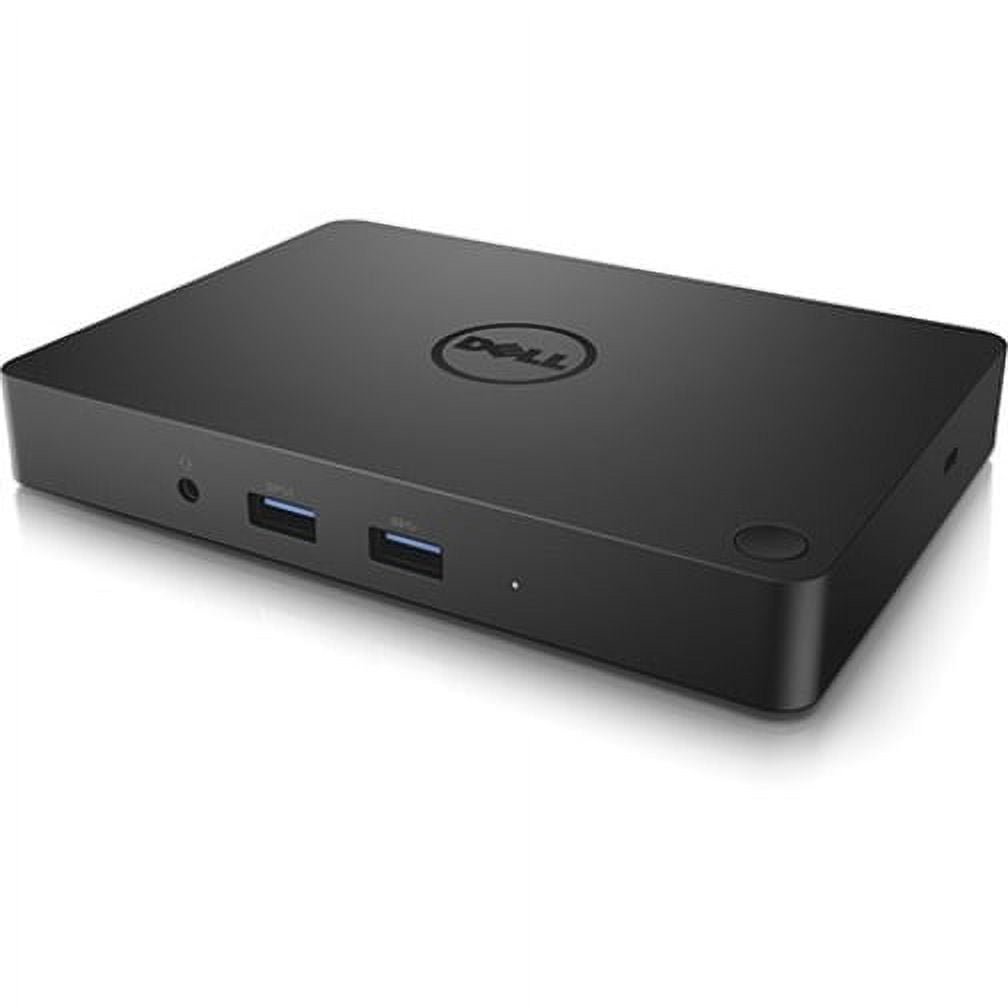
- Dell WD15 Docking Station
0 ratings


Artikelnummer:
63203714
Dell WD15 Docking Station
Artikelnummer:
63203714
SEK 731
Prisuppgifter
Excluding Shipping & Custom charges ( Shipping and custom charges will be calculated on checkout )
*All items will import from USA
0 ratings
Skriv en recension
I lager
 Importerad från butiken USA
Beställ nu och få den ungefär på Torsdag, Augusti 20
Säker transaktion
Ubuy arbetar hårt för att skydda din säkerhet och integritet. Vårt avancerade betalningssäkerhetssystem säkerställer konfidentialitet genom att kryptera din information vid överföring med hjälp av AES (Advanced Encryption Standards) och SSL (Secure Socket Layer) protokoll. Dina betalningsuppgifter är 100% säkra eftersom vi inte delar dem med tredjepartssäljare.
Våra främsta logistikpartners


Elevate your workspace with the Dell WD15 Docking Station, offering unmatched connectivity with 5 USB ports and dual display options!

Köp nu, betala senare

Fast
Shipping

Gratis
returrätt*

Säker förpackning

100% originalprodukter

PCI DSS-efterlevnad

ISO 27001-certifierad


Note: Step Down Voltage Transformer required for using electronics products of USA store (110-120). Recommended power converters Köp nu.


Utmärkande egenskaper
Versatile Connectivity
Offers multiple ports including USB-C, HDMI, and Ethernet, seamlessly connecting various devices for enhanced productivity in a single connection.
Power Delivery
Delivers up to 130W of power through USB-C, charging laptops while enabling data transfer, ensuring devices stay powered all day without extra chargers.
Compact Design
Space-saving and portable design makes it ideal for home offices and workspaces, providing functional expansion without clutter.
Produktinformation
- Dell WD15 Docking Station with USB Type C interface
- 5 x USB Ports, including 3 x USB 3.0 and 2 x USB 2.0
- Features HDMI, VGA, and Mini DisplayPort for video output
- Includes Network (RJ-45) port and Audio Line Out
- Connectivity via Thunderbolt technology
- California Proposition 65 warning: n/a
| Compatibility | Latitude 15 (E5570), Precision 15 (3510), Precision 15 (5510), Precision 15 (7510), Precision 17 (7710), XPS 15 (9550) |
| Inputs/Outputs | 5 x USB Ports, 2 x USB 2.0, 3 x USB 3.0, Network (RJ-45), HDMI, VGA, Mini DisplayPort, Audio Line Out, Thunderbolt |
| Usb version | USB 3.0 |
| Input/output quantity | 5 |
| Brand | Dell |
| Model name | WD15 |
| Has written warranty | No |
| Color | Black |
| Weight | 1 lb (450 grams) |
| Input/output direction | Bi-Directional |
Vem bör köpa?

-
Business Professionals
Ideal for users needing multiple displays and connectivity options for efficient multitasking and productivity in office environments.
-
Frequent Travelers
Great for users who require a portable docking solution that easily connects laptops to external devices when on the go.
-
Creative Designers
Perfect for designers utilizing high-resolution monitors and diverse peripherals for graphic design, video production, or 3D modeling.

-
Gaming Enthusiasts
Not suitable for gamers seeking high performance, as it may not provide the necessary bandwidth for gaming peripherals.
PRODUKTBESKRIVNING
Dell WD15 Docking Station
Har du någon fråga? Chatta med oss
Kundfrågor och svar
-
Fråga:
What types of USB ports does the Dell WD15 Docking Station have?
Svar: The docking station has a total of 5 USB ports, comprising 3 USB 3.0 and 2 USB 2.0 ports. -
Fråga:
Can I use multiple displays with the Dell WD15 Docking Station?
Svar: Yes, the docking station supports both HDMI and VGA connections for dual display setups. -
Fråga:
Is the Dell WD15 Docking Station easy to set up?
Svar: Absolutely! It features a simple plug-and-play setup via the USB Type C connection for quick installation.
Dell Docking Stations & Locks Editorial Review
The Dell WD15 Docking Station offers a robust solution for users seeking to streamline their workspace and enhance their connectivity options. Designed specifically for devices like the XPS 13 9315, this dock stands out for its single power button feature, which allows users to power on their laptops easily and reduce desktop clutter. Users have noted that the WD15 maintains a cool operation, which is a Considerable improvement over other hubs that may experience overheating during extensive use. With an HDMI port capable of supporting a 4K monitor, along with several USB 3.0 and Ethernet ports, the docking station serves adequately for light office tasks. While it excels in basic functionality, it does have some limitations. Users have expressed disappointment over the necessity of a dedicated dongle to utilize the DisplayPort, as well as the requirement of initial setup time, including a couple of reboots. The lack of built-in USB-C support and the use of a traditional barrel plug instead of a more modern USB PD design has also raised concerns about the device's future-proofing capabilities. Nonetheless, the WD15 provides a user-friendly interface for managing multiple peripherals while ensuring decent functionality for everyday tasks. For those with more advanced needs, like multiple 4K displays or numerous external drives, alternative, higher-end docks might be worth Considering. However, the WD15 presents a compelling option for users looking for a reliable docking station without breaking the bank. **
Kundrecensioner & betyg
1 kunders betyg
-
5 stjärna
100%
-
4 stjärna
0%
-
3 stjärna
0%
-
2 stjärna
0%
-
1 stjärna
0%
Recensera denna produkt
Dela dina tankar med andra kunder
Fördelar
- Single power button simplifies startup.
- Good selection of ports for basic connectivity (HDMI for 4K, multiple USB 3.0, Ethernet).
- Reduces desk clutter compared to having multiple cables.
Nackdelar
- Requires a dongle for DisplayPort connectivity.
Förtroende och köptrygghet

MA
Mohammad
Verifierad köpare
“Excellent quality and original too,when ubuy send original things I will appreciate that ,I very satisfied thank you”
23 July 2026 · via Trustpilot
CK
Chitra
Verifierad köpare
“The order and delivery progress was communicated very well. Package arrived within the estimated time. Products arrived as expected in good condition.”
22-Jul-26 · via Trustpilot
K
kund
Verifierad köpare
“Good supply of products. Safe payment methods, and shipment worldwide! Genuine products.”
23-Jul-26 · via Trustpilot
OO
Onesi
Verifierad köpare
“Was my first time buying a product from Ubuy, but I found it so helpful. This is reliable. Gonna place a new order!”
22 July 2026 · via Trustpilot
SJ
SAO JOHN
Verifierad köpare
“Ubuy is a great online platform to buy stuff. Reliable, fast delivery time and great value for money. I've been using Ubuy online shopping platform for three years now and will continue to do so.”
23 July 2026 · via Trustpilot
Säker utcheckning
Global leverans
Enkel retur
Äkta produkter
Produktens prishistorik
Viktig information
- Begränsningar: För produkter som skickas internationellt, observera att eventuell tillverkargaranti kanske inte är giltig; tillverkarens serviceallternativ kanske inte är tillgängliga; produktmanualer, instruktioner och säkerhetsvarningar kanske inte finns på destinationslandets språk; produkterna (och tillhörande material) kanske inte är utformade i enlighet med destinationslandets standarder, specifikationer och märkningskrav; samt produkterna kanske inte överensstämmer med destinationslandets spännings- och andra elektriska standarder (vilket kan kräva användning av en adapter eller omvandlare om det är lämpligt). Mottagaren ansvarar för att säkerställa att produkten lagligen kan importeras till destinationslandet. Vid beställning från Ubuy eller dess dotterbolag är mottagaren registrerad importör och måste följa alla lagar och regler i destinationslandet.
- Alla produkter som visas på Ubuy är inte till försäljning, eftersom Ubuy är en global sökmotor. Produkterna omfattas av export-/handelsbestämmelser.
SEK 731
Beställ nu och få den ungefär på Torsdag, Augusti 20
Denna artikel är inte begränsad i mitt land. (Klicka på ovanstående länk om den här artikeln inte är begränsad i ditt land, så vårt team kommer att granska och tillåta.)
Antal:
Säker transaktion
PCI DSS-kompatibel och ISO 27001:2022-certifierad, med krypterade betalningar och fullt köparskydd på varje beställning.
Våra främsta logistikpartners
Snabbast gränsöverskridande leverans
Funktioner
- Maximize productivity with 5 USB ports including 3 USB 3.0 for faster data transfer.
- Supports HDMI, VGA, and Mini DisplayPort for versatile dual display capabilities.
- Connect to the internet effortlessly with a built-in Network (RJ-45) port.
- Designed for a seamless connection via USB Type C technology.
- Ideal for home offices, workspaces, or on-the-go professionals.
- Stable wired connectivity ensures reliability and enhanced performance.
Ubuy-garantin
Upplev bekymmersfri shopping med 100 % originalprodukter, PCI DSS-kompatibel betalningssäkerhet, ISO 27001-certifierat dataskydd, snabbaste gränsöverskridande leverans, fri retur och säker förpackning på varje beställning.